The Criterion Channel
- 4.5
- Rating
- 100.00K
- Installs
- Free
- Price

 Analysis by App-foxy
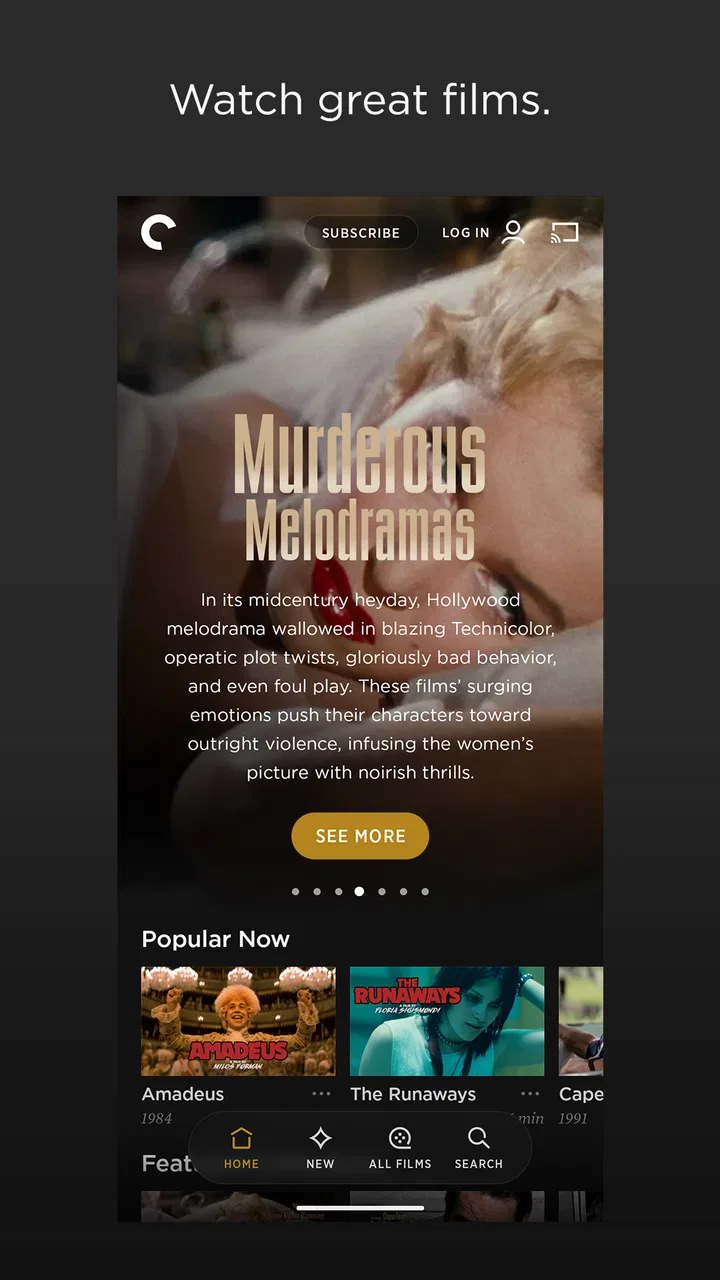
I approached The Criterion Channel as someone looking for a more thoughtful way to watch films on a phone or tablet, not simply another place to scroll through endless entertainment. Developed by The Criterion Collection, this free entertainment app is built around classic movies and related viewing material. That focus gives it a clearer personality than a general streaming service, although it also means the experience is best suited to viewers who already enjoy older, international, independent, or carefully curated cinema.
My first impression was that the app makes sense when I treat it as a companion to deliberate watching. I am not opening it for background noise while doing chores or expecting the largest possible selection of current mainstream releases. I use it when I want to choose a film with some intention, settle in, and pay attention to the work itself. That distinction matters because the app’s appeal comes less from quantity and more from the kind of viewing it encourages.
What makes the viewing experience feel trustworthy
The Criterion Collection is a recognizable name in film preservation and presentation, so the developer gives the app a clear identity from the beginning. The store listing describes it simply as a place to watch classic movies and more, but in practice that short description points toward a specialized catalog rather than a broad entertainment supermarket. I find that specialization reassuring: I know why I am here, and I am less likely to confuse the service with a general-purpose video app.
You May Also Like

 Blood Strike: 2.5 Anniversary
Blood Strike’s Loadouts Turn Every Drop Into a Tactical Gamble
A close look at Blood Strike’s custom loadouts: how fast access to signature weapons reshapes its battle royale rhythm, rewards preparation, and narrows the gap between fights.

 Pandora - Music & Podcasts
Pandora’s Music Is Easy to Start, but Harder to Recover
Pandora’s strength is its low-effort path from a seed to a station. Its weak spot is how much confidence it asks you to place in connection, setup, and quiet recovery.

 8 Ball Pool
8 Ball Pool Is Built on Rivalries, Rematches, and Routine
A close look at the rivalries, rematches, shared routines, and unanswered safety questions that turn a quick pool match into a persistent mobile community.

 Samsung Music
Samsung Music’s Quiet Strength Is Playing What You Already Own
Its reach comes less from spectacle than from dependable access to a personal library. That simplicity is both the app’s strongest retention engine and its ceiling.

 AccuWeather: Weather Radar
AccuWeather Review: A Quick, Clear Forecast for Everyday Decisions
For everyday plans, the best forecast is the one you can understand quickly. AccuWeather makes rain timing, radar, and local conditions easy to act on, with a few trade-offs.

 Hill Climb Racing
Why Hill Climb Racing Still Turns Crashes Into One More Run
A tiny car, a bumpy hill and one more upgrade: Hill Climb Racing keeps resurfacing because its simple chaos makes every near-miss feel personal.
More From Our News Desk



The app is free to install, which makes trying it relatively easy. Its Teen content rating is also useful context for households deciding whether it belongs on a shared device. That label should not be treated as a personal recommendation for every younger viewer, but it does provide a basic signal that the service is not positioned as a children’s-only movie library. I would still make individual viewing decisions based on the specific film.
Its audience is established enough to make the service feel like a real, maintained product rather than an obscure experiment. The app has passed one hundred thousand installs, with an average rating of 4.5 from roughly 5.2 thousand ratings. Those figures do not guarantee that every device or viewing habit will feel perfect, but they do suggest that the core experience works well for a substantial group of film viewers.
At the same time, trust is not the same as blind confidence. I prefer to judge an app by what I can actually control while using it: whether account choices are understandable, whether payment steps are visible, whether the app asks for anything that feels unrelated to watching, and whether I can make sensible decisions before committing. The Criterion Channel benefits from having a focused purpose, but I still recommend reading each on-screen prompt rather than accepting everything automatically.
The free download is not the whole cost question
Although the app itself is free, it includes in-app purchases ranging from $10.99 to $99.99 per item. That is the detail I would pay the most attention to before handing a phone or tablet to someone else. A free installation can create the impression that all viewing is immediately included, while the presence of paid items means the user should understand which access or content choices involve money.
My practical advice is simple: install the app, look through the available options, and pause at every purchase screen. If I were setting it up for a family member, I would make sure the device’s purchase authentication is active and that the person using the app knows the difference between browsing, starting access, and confirming a charge. This is not a criticism unique to this service; it is the sensible habit for any entertainment app with optional payments.
The current version is 10.303.1, and the app supports devices running Android 8.0 or later. That compatibility range is helpful for people using older Android hardware, though support alone does not tell me how comfortably the app will perform on every model. On an aging phone, screen size, storage, battery condition, and network quality can matter just as much as the operating-system requirement. I would update the device and the app before judging the service from a single poor session.
Controls matter more than a polished first screen
When I evaluate a streaming app, I look beyond the attractive catalog. I want to know whether I can make informed choices about my account and spending. With this service, the most important user-controlled moments are the account setup, any sign-in or subscription flow presented on screen, and the confirmation step before an in-app purchase. I would not rush through those screens simply because I am eager to start a movie.
A useful workflow is to separate discovery from commitment. I can browse the app to decide whether its film selection fits my taste, then return to the account or purchase decision once I know I will actually use it. That prevents the common mistake of paying first and only afterward discovering that a specialized catalog is not what I wanted. For me, this is one of the strongest ways to preserve user agency in a service built around paid viewing choices.
I also recommend checking the app’s settings after installation rather than assuming the default arrangement is ideal. Look for account information, notification choices, playback-related options, and any device-level purchase controls that affect the experience. I would only enable what I find useful. If a setting is unclear, leaving it unchanged until I understand it is safer than turning on every prompt just to move faster.
There is a difference between an app being easy to use and an app making every consequence obvious. A movie service can feel simple because the main action is pressing play, while the less visible questions involve account access, billing, and what happens when another person uses the same device. I therefore treat the first setup as part of the review, not as an annoying formality.
Where privacy awareness becomes practical
Entertainment apps naturally involve sensitive moments even when the content itself is harmless. A viewing history can reveal interests, moods, cultural preferences, or the kinds of subjects someone chooses to explore. I would be especially careful on a shared tablet or family phone, where the person watching may not be the person who created the account.
That is why I would avoid sharing account credentials casually. If another viewer needs access, I would first consider whether the available account arrangement and device controls make that comfortable. I would also sign out on equipment that does not belong to me, particularly a borrowed tablet or a television device in a guest space. These steps are ordinary, but they reduce the chance of leaving account access or viewing activity behind.
Notifications are another small but meaningful choice. A message that appears on a lock screen can expose the name of a film or reveal that someone is using the service. If privacy matters, I would review the phone’s notification settings and limit lock-screen previews where appropriate. This is a device-level decision, but it is part of using a film app responsibly because the viewing context can be personal.
I would also avoid assuming that a free installation means the service has no account or data implications. The right approach is to read the app’s own permission and privacy explanations when they appear, then grant only what is necessary for the way I plan to use it. I do not infer extra practices from the app’s category or developer name. I judge the choices shown to me and keep my own permissions as narrow as possible.
For a particularly privacy-conscious viewer, the best routine is to use a personal device, keep the operating system current, protect the account with a strong password, and review purchase authentication before watching. None of that makes the app inconvenient in a meaningful way. It simply recognizes that a streaming account is still an account, not a disposable window with no consequences.
A realistic evening with the app
Imagine that I have an hour and a half after dinner and want something more memorable than another random recommendation. I open the app on a personal tablet, browse without immediately purchasing anything, and narrow the choice to a film that matches my mood. Before starting, I check that I am using the intended account and that the device is not likely to be passed to a child afterward. That small pause prevents a surprising number of avoidable mistakes.
Once I choose, I put the tablet on a stand rather than holding it throughout the film. The app is more rewarding when I treat the movie as the main event. I keep notifications quiet, use headphones if other people are nearby, and avoid switching between several entertainment apps. This may sound obvious, but the specialized nature of the catalog makes concentrated viewing feel like the right way to use it.
If I am watching with a friend, I would discuss the choice before starting rather than relying on a fast autoplay habit. One person may want a famous classic, while another may prefer something less familiar. Because the service is not aimed at every possible taste, agreeing on expectations matters more here than it does on a general streaming platform. A little conversation can turn the narrower catalog into an advantage instead of a limitation.
For travel, I would prepare before leaving rather than assuming that a weak connection will be fine. I would check the app’s own available viewing controls and confirm what is offered for the particular title or account. I would not promise myself that every film can be handled identically across devices. The useful principle is to test the exact setup before the journey, especially if the movie is meant to be the main entertainment on a flight or in a hotel.
Where it beats general streaming services
The biggest advantage is focus. General streaming apps are good when I want to search across many genres, catch a current popular show, or let a household choose different kinds of entertainment. The Criterion Channel is more attractive when I want a film-centered environment with a stronger sense of curation. It helps me escape the feeling that I am comparing thumbnails forever without actually choosing anything.
That focus also changes how I judge value. I do not ask whether it replaces every other streaming subscription. I ask whether I will watch enough of its particular kind of cinema to justify keeping it in my routine. For a film student, a serious movie fan, or someone building a personal knowledge of classic cinema, the answer may be yes. For a viewer who mainly wants recent blockbusters, casual comedy, or children’s programming, a broader alternative will probably be more useful.
The trade-off is variety within a niche. A large mainstream service may offer more familiar titles and a smoother answer to the question, “What can everyone watch tonight?” This app is better at the question, “What worthwhile film should I give my full attention to?” Neither approach is universally superior. The right choice depends on whether discovery or convenience is the priority.
I also would not install it expecting the same social or algorithmic experience as a general entertainment platform. Its value is not that it constantly fills every spare minute. In my view, that is a strength for intentional viewers and a weakness for people who want effortless, endlessly changing background content. The app asks me to bring some curiosity of my own.
Who should try it, and who should skip it
I would recommend giving it a serious look if you enjoy classic cinema, want to explore films outside the usual mainstream rotation, or prefer choosing one substantial movie instead of browsing several services. It is also a good fit for someone who values a recognizable film identity and is willing to make deliberate account and payment decisions.
I would be more cautious about recommending it to a household that needs a single service for every age and every mood. The Teen rating is a useful boundary, but it does not turn the catalog into a dedicated family service. I would also steer away from it if your main goal is current popular entertainment or a very broad selection of casual viewing. The app’s specialization is precisely what makes it less suitable for those needs.
People with older Android phones should check the operating-system requirement before installing, and anyone sharing a device should think through account access and purchase confirmation first. Those are not reasons to reject the app; they are reasons to set it up carefully. The best experience comes when the device, the account, and the viewer’s expectations all match the service.
My cautious verdict
After looking at it as both a film app and an account-based entertainment service, I see The Criterion Channel as a strong choice for intentional movie watching rather than universal household streaming. The developer’s focused identity gives the app credibility, and the free installation makes it easy to explore. Its 4.5 average and more than 100K installs suggest that many viewers are satisfied with the direction it takes.
My reservation is not about the idea of the app; it is about fit and attention. The catalog’s specialized character will not suit everyone, and the in-app purchase range means I would never let a new user tap through billing screens without reading them. I would also take ordinary privacy steps: use a protected personal account, review notifications, avoid casual credential sharing, and check the choices presented during setup.
My recommendation is to try it when you want cinema with intention, not when you want an all-purpose entertainment toolbox. If that describes you, the app can become a rewarding part of a viewing routine. If you mainly want the broadest, easiest selection for an unpredictable group, another streaming option may serve you better. The Criterion Channel earns my recommendation precisely because it knows what kind of viewer it is for, and I can make a clear decision before I commit my time or money.
In short, I would keep it in mind for quiet evenings, film discovery, and viewers who enjoy giving a movie their full attention. I would install it with purchase controls in place, review the account choices instead of accepting them automatically, and judge it by how often its particular catalog genuinely improves my watching. That is a more honest test than treating every free entertainment download as interchangeable.
FAQs for The Criterion Channel
01What is The Criterion Channel?
The Criterion Channel is a subscription-based streaming app focused on classic, independent, international, and art-house cinema. Its catalog includes films from The Criterion Collection, documentaries, filmmaker interviews, special features, and curated programs. Rather than offering the broadest selection of mainstream releases, the service is designed for viewers who enjoy carefully selected films, film history, and deeper context around the movies they watch.
02How much does The Criterion Channel cost, and is there a free trial?
The Criterion Channel generally requires a paid subscription, with monthly and annual plans available through its official website or supported app stores. Pricing, taxes, promotional offers, and trial availability can change over time and may vary by region. Before subscribing, check the current terms shown during registration, including renewal details, cancellation rules, and whether any introductory trial automatically converts into a paid membership.
03Can I watch The Criterion Channel on Android and iOS devices?
Yes, The Criterion Channel is available for compatible Android and iOS phones and tablets, allowing subscribers to stream films away from a computer. The exact experience depends on your device, operating-system version, internet connection, and app updates. It may also support additional platforms such as web browsers and selected television devices, so users should confirm compatibility in their local app store before downloading.
04Does The Criterion Channel support offline downloads?
Offline viewing availability can depend on the current app version, subscription status, device, and the specific title or region. If downloads are supported for your account, eligible films can typically be saved through the mobile app for watching without an internet connection, subject to licensing limits and expiration rules. Check each movie’s options inside the app rather than assuming the entire catalog is downloadable.
05Is The Criterion Channel available everywhere, and what content does it include?
The Criterion Channel’s availability and catalog are limited by regional licensing agreements, so the service may not be offered in every country and some films may differ by location. Its library commonly features classic Hollywood, world cinema, independent productions, documentaries, shorts, and curated collections. Content can rotate, meaning a film available today may later leave the platform or become unavailable in your region.
Pros
- Excellent selection of acclaimed classic and independent films.
- Curated collections provide useful context and discovery.
- Includes many films with director and cast interviews.
- High-quality video streaming with support for multiple devices.
- Ad-free viewing creates a focused movie-watching experience.
Cons
- Availability varies by country and may be limited outside the U.S.
- The catalog focuses on cinephiles rather than mainstream entertainment.
- Some older films have dated image or audio quality.
- Requires a paid subscription after the trial period.
- Mobile downloads and offline viewing may not cover every title.

The Criterion Channel
Gallery